
Yes, CapCut now has an official MCP connection, but only for Codex and the ChatGPT desktop app. CapCut’s plugin page calls it a “CapCut MCP connection”, and the installer behind it registers an MCP server named capcut_creation in Codex and signs it in to your CapCut account. Claude Code has no official CapCut server. There you can run a community CapCut MCP server that writes CapCut draft files, or let Claude Code edit in ChatCut and send the finished timeline to CapCut as an editable draft.
We make ChatCut, which is one of the three routes below. On November 21, 2026 we read CapCut’s plugin page and the installer runbook it points to, read the READMEs of three community servers, and ran the ChatCut route from Claude Code on a Mac. That Mac had no CapCut installed, so the CapCut side of route 3 follows ChatCut’s CapCut draft documentation. The Claude Code chat window shown below is a recreation of its interface; the message inside it is ChatCut’s real response.
Is there an official CapCut MCP server?
Yes, for Codex. CapCut × Codex is CapCut’s official plugin page; its headline reads “CapCut × ChatGPT”. You paste CapCut’s install prompt into a Codex task, and the prompt tells Codex to read a SKILL.md runbook hosted on TikTok’s CDN and follow it. As of November 21, 2026, that runbook installs plugin version 0.3.1 on macOS or Windows, registers the capcut_creation MCP server with Codex, and ends with an OAuth sign-in to your CapCut account.
The runbook’s first-use message says the plugin can edit videos and find trending templates, and that in the ChatGPT desktop app it can also add captions and creative elements, generate videos and images, and create slide decks. CapCut’s page names the ChatGPT desktop app and Codex. It does not mention Claude, Claude Code or the Codex CLI, and it lists no prices or plan requirements; access and generation limits “may depend on the account”. If a guide tells you CapCut has no official MCP server, check its date.
Three ways to connect an AI agent to CapCut
| Route | Agents | Where the edit happens | What you get | Watch out for |
|---|---|---|---|---|
| CapCut’s official plugin | Codex, ChatGPT desktop app | CapCut’s service, signed in to your CapCut account | Videos that stay editable on a CapCut timeline | Not documented for Claude; access and limits depend on your account |
| Community CapCut MCP servers | Claude Code, Claude Desktop or another MCP client | Your computer, by writing CapCut draft files | A CapCut draft you open in CapCut desktop | Third-party code; CapCut’s draft format is undocumented and changes between versions |
| ChatCut MCP, then a CapCut draft | Claude Code, Codex, Cursor, Antigravity and other agents | A ChatCut Desktop timeline on your computer | An edited timeline exported as an editable CapCut draft | ChatCut Desktop and CapCut must be on the same computer; some ChatCut-only properties don’t transfer |
How we checked
- CapCut: read the CapCut × Codex page and the SKILL.md runbook its install prompt points to (plugin version 0.3.1). We did not install the plugin.
- Community servers: read the READMEs of VectCutAPI, capcut-mcp-server and capcut-mcp. We did not install them either.
- ChatCut: connected Claude Code to ChatCut Desktop on macOS and asked ChatCut’s export tool for a CapCut draft (the result is in step 3 below).
Route 1: CapCut’s plugin for Codex and ChatGPT
Choose this when you want CapCut itself to do the work from a chat. CapCut’s page lists generating images and video from a prompt, uploading an existing draft, shortening scenes, reordering clips, replacing visuals, adjusting text timing, updating music, adding captions or effects, finding templates and stock assets, and opening the CapCut editor for track-level edits.
- Open CapCut’s plugin page and copy the install prompt.
- Paste it into a new Codex task. Codex follows the runbook and asks for your approval when it needs network access, file writes outside the workspace or a browser.
- Sign in to your CapCut account when Codex opens the sign-in page, then return to the task.
- Describe the video you want. CapCut’s page says the result is “not an automatic guarantee of a complete or final video”, so review it in the CapCut editor.
The install prompt asks the agent to follow a remote file exactly. Open that file yourself first and read what it will run.
Route 2: community CapCut MCP servers for Claude Code
Community servers don’t connect to CapCut’s service. They write the draft files that CapCut desktop reads from disk, so any MCP client can use them, Claude Code included, and no CapCut sign-in is involved.
| Project | How it works | Needs | License |
|---|---|---|---|
| VectCutAPI (about 2.4k GitHub stars) | A Python HTTP API on port 9001 plus an MCP server that build new CapCut or Jianying draft folders with video, audio, text, subtitles, effects and keyframes | Python 3.10+, FFmpeg | Apache-2.0 |
| capcut-mcp-server | A TypeScript MCP server with 11 tools that forwards each call to a running VectCutAPI | Node, plus VectCutAPI at localhost:9001 | MIT, per its README |
| capcut-mcp | Reads and edits existing CapCut desktop drafts directly: list drafts, read the timeline, add, move, trim, split or delete segments, then validate and save | Node 18+, ffmpeg and ffprobe | MIT |
capcut-mcp is the only one of the three whose README gives a Claude Code command. Clone the repository, run npm install, then register it:
claude mcp add capcut --scope user -- node "/ABSOLUTE/PATH/TO/capcut-mcp/src/server.js"What to watch for, from the projects’ own notes:
- Close CapCut first. capcut-mcp refuses to save while CapCut is running or the draft has a
.lockedfile, because CapCut autosaves over outside changes. - CapCut updates can break drafts. CapCut’s draft format is proprietary and undocumented, and it changes between versions. Note the CapCut version that works and test again after every update.
- Effects are best-effort. capcut-mcp adds effects and transitions on a best-effort basis, and its text tool needs a template draft that already contains a text layer.
- They assemble; they don’t decide. These servers place the clips, text and effects your agent specifies. Finding the right cuts in a long recording is still the agent’s job.
Route 3: edit with ChatCut’s MCP server, finish in CapCut
Here the agent works on a real editing timeline in ChatCut Desktop, with tools for transcription, cuts, captions, motion graphics and audio. When the edit is done, ChatCut Desktop writes it into CapCut’s draft folder as an editable draft. Creating the draft is free; including motion graphics can require a paid ChatCut plan.
Step 1: Connect your agent to ChatCut Desktop
ChatCut Desktop runs on macOS 13+ and Windows 10+ (x64); Linux isn’t supported. Paste this prompt into a new Claude Code session or Codex task. The agent installs ChatCut Desktop, which then connects itself to the agent:


-
 Codex
-
 Claude Code
-
 Antigravity
-
 Hermes Agent
- + any MCP client
Sign in to ChatCut, then start a new session so the agent loads ChatCut’s tools. The setup pages cover each agent: the ChatCut plugin for Claude Code and ChatCut for Codex and ChatGPT.
Step 2: Ask for the edit
Describe the edit in plain language. The video below is the shared master project from our agent tutorials: a 2-minute 48-second talking-head take cut to 60 seconds, with word-by-word captions, two punch-in zooms, a motion graphics title, one generated B-roll shot and music that ducks under the voice.
An external agent (Codex) ran that master edit in ChatCut Desktop. Claude Code gets the same ChatCut tools; the step-by-step version, with a prompt for every step, is in how to edit video with Claude Code.
Step 3: Export an editable CapCut draft
In ChatCut Desktop, select Export, open the CapCut tab (剪映 in the Chinese interface) and select Export. If both CapCut and Jianying Pro are installed, choose the app under App first. If the timeline has motion graphics, an Include section lets you render them into the draft as video clips with a transparent background.
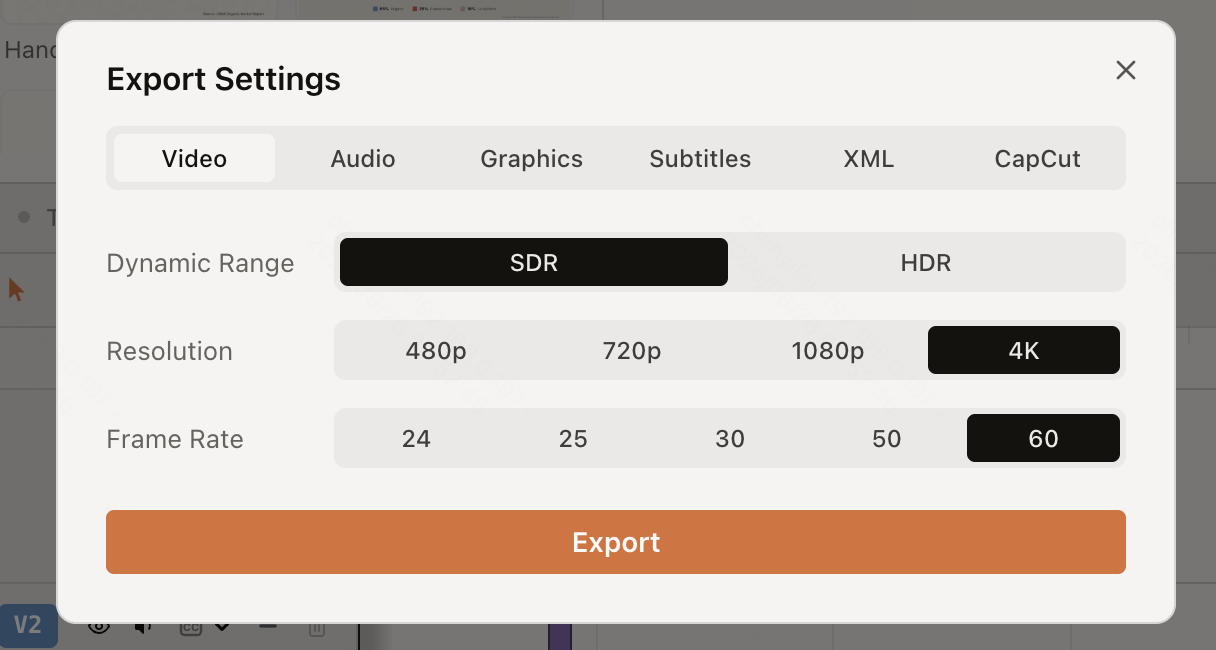
Your agent can do this step too. ChatCut’s export tool has a CapCut target that writes the timeline and its media into CapCut’s draft folder and offers to open CapCut. We asked Claude Code for a draft on a Mac without CapCut:
You: Export this timeline as an editable CapCut draft.
Claude: ChatCut couldn't create the draft. Its export tool returned: "Neither 剪映专业版 nor CapCut is installed on this machine, so there is nowhere to put the draft." Install CapCut on this Mac, open it once, and I'll export again.
So install CapCut desktop first and open it once; CapCut creates its draft folder on first launch, and ChatCut writes the draft there.
Step 4: Check the draft in CapCut
In the Imported to CapCut dialog, select Open CapCut, or Restart CapCut if it was already running so the new draft appears. Then:
- Read the support list before you export. In ChatCut’s export dialog, expand Some items aren’t supported; anything under Not supported has to be added again in CapCut.
- Leave your source files alone. The draft points to your original media on this computer, so don’t move those files or rename the draft.
- Find a missing draft. If CapCut’s draft location was changed, the draft may not show in CapCut’s list; use Show in Finder (Find In Folder on Windows) in the dialog.
Finishing in Premiere Pro or DaVinci Resolve instead? The same timeline exports as FCP7 XML; our DaVinci Resolve MCP guide covers Resolve’s own MCP route.
Which CapCut route should you choose?
- You work in Codex or the ChatGPT desktop app and want CapCut’s generation, templates and stock: install CapCut’s plugin.
- You want Claude Code to place clips in an existing CapCut draft and can maintain open-source code: try capcut-mcp, and keep backups of your drafts.
- You want the agent to make the editing decisions, such as cutting filler words and retakes from the transcript and adding captions, titles and music, and still finish in CapCut: edit in ChatCut and export a CapCut draft.
- You only need a finished video file: skip CapCut and export the MP4 from ChatCut Desktop.
Prompts to try with ChatCut
Use these in Claude Code or Codex after ChatCut is connected:
Troubleshooting
- “Neither 剪映专业版 nor CapCut is installed on this machine”: ChatCut’s export tool found no CapCut install. Install CapCut desktop on the same computer and open it once.
- No CapCut tab in Export Settings: you are in ChatCut on the web, or ChatCut Desktop hasn’t detected CapCut. Close and reopen Export Settings after installing; detection refreshes when the dialog opens.
- CapCut tab visible but Export disabled: open CapCut once so it creates its draft folder, then reopen Export Settings.
- The draft doesn’t appear in CapCut: restart CapCut, or use Show in Finder / Find In Folder if CapCut’s draft location changed.
- A community server can’t save: close CapCut. capcut-mcp won’t write while CapCut is running or a
.lockedfile exists.
CapCut MCP questions
Is there an official CapCut MCP server?
Can Claude Code edit CapCut projects?
Is ChatCut the same as CapCut?
Does exporting a CapCut draft from ChatCut cost anything?
Does the export work with Jianying (剪映)?
How is CapCut's plugin different from ChatCut?
Want the whole edit for your agent? Read how to edit video with Claude Code, Codex, ChatGPT or Cursor, or compare more video editing MCP servers.